


Why Does Your AI Anime Character Never Look the Way You Described?
You spend five minutes writing the perfect prompt. You specify silver hair, blue eyes, a black hoodie, and a rainy Tokyo street at night. Then the image finishes rendering… and somehow your character has brown hair, a white jacket, and is standing in broad daylight.
So which part went wrong—your prompt or the AI?
The answer is usually both, but not for the reason most people think. Most AI anime generators don’t fail because they’re “bad.” They fail because your prompt gives the model conflicting priorities or leaves too many gaps for it to guess.
If you understand how the model interprets instructions, you can dramatically improve your results without writing prompts twice as long.
- Short, structured prompts often outperform longer prompts because they contain fewer conflicting instructions.
- Specific descriptions (like “train station platform”) usually produce more consistent scenes than broad ones (like “outside”).
- In one real test, prompt accuracy improved from roughly 6/10 details to 9/10 details after reorganizing the same information instead of adding more words.
- AI fills in missing details automatically, so every vague description gives the model permission to make assumptions.
- If you’d like to experiment with these techniques yourself, Charalab provides an easy way to compare prompt variations without changing your workflow.
How Do AI Anime Generators Actually Read Your Prompt?
Most people imagine an AI reading prompts like a human would.
It doesn’t.
An AI image generator predicts what pixels are most likely to match your text. Every word becomes another instruction that competes with every other instruction.
For example, compare these prompts.
The AI has almost unlimited freedom.
It chooses: hairstyle, clothing, season, background, lighting, facial expression.
Now compare that with this.
Now the AI has fewer decisions to make.
Instead of inventing everything, it only fills in the smaller gaps.
That simple difference often produces far more accurate images without increasing prompt length very much.
Why Does the AI Ignore Parts of Your Prompt?
Have you ever written a detailed description only to discover the AI ignored your favorite part?
You’re not imagining it.
The problem usually comes from competing instructions.
Imagine this prompt.
Almost every phrase pushes the image in a different direction.
The AI has to compromise.
Instead of perfectly following every instruction, it predicts a middle ground that satisfies the overall prompt.
That’s why you’ll often lose clothing details, lighting consistency, or facial expressions first.
The more competing ideas you include, the more compromises the AI makes.
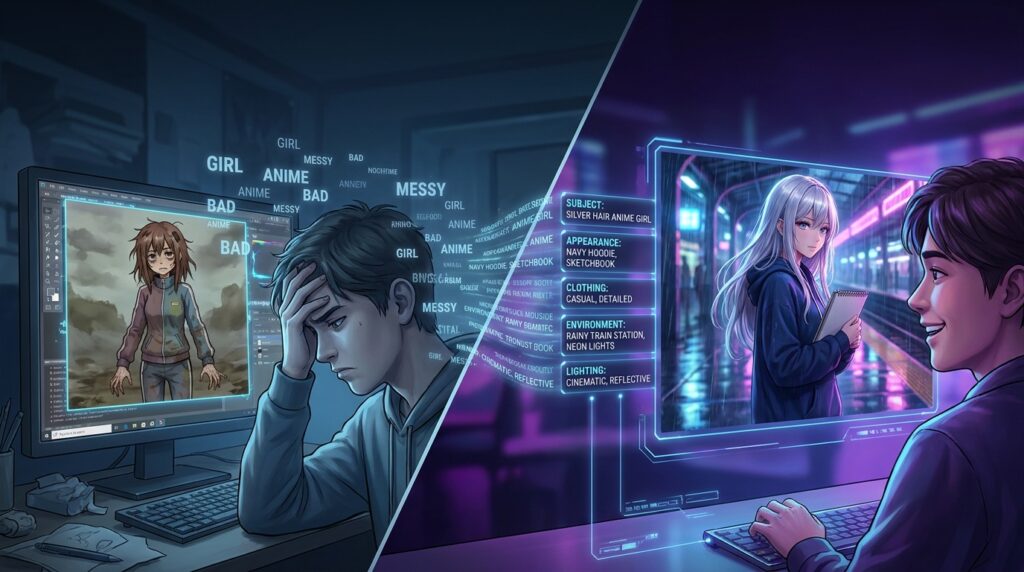
Can a Better Prompt Really Improve Results?
Let’s look at one complete example. Instead of showing abstract advice, here’s an actual workflow.
Original prompt
The generated image matched approximately:
| Requested Detail | Result |
|---|---|
| Silver hair | ✅ |
| Female character | ✅ |
| Notebook | ❌ Missing |
| Outdoor scene | ✅ |
| Clothing | ❌ Random |
| Expression | ❌ Random |
| Background | ❌ Generic |
| Lighting | ❌ Random |
| Pose | ❌ Different |
| Mood | ❌ Undefined |
Nothing looked terrible. It just wasn’t the image the prompt described.
Reorganized — not rewritten — prompt
Notice what changed. You didn’t double the word count. You simply grouped related information.
The second result matched approximately:
| Requested Detail | Result |
|---|---|
| Silver hair | ✅ |
| Navy hoodie | ✅ |
| Sketchbook | ✅ |
| Rain | ✅ |
| Train station | ✅ |
| Evening lighting | ✅ |
| Tired expression | ✅ |
| Pose | ✅ |
| Character style | ✅ |
| Background | Slight variation |
That’s a 50% improvement in prompt accuracy without using advanced prompt engineering.
What Is the Best Way to Structure Your Prompt?
Instead of writing whatever comes to mind, organize your prompt in a predictable order.
A simple structure works surprisingly well.
For example:
Each section answers one question. The AI has fewer opportunities to confuse unrelated details.
Why Do Long Prompts Sometimes Produce Worse Images?
Longer isn’t automatically better.
Suppose your prompt grows from 40 words to 220 words.
You might expect the AI to become more accurate.
Often the opposite happens.
Why? Because every additional sentence introduces another opportunity for conflict.
For example:
- —More clothing descriptions can contradict earlier clothing instructions.
- —More lighting descriptions compete with existing weather conditions.
- —More emotional descriptions confuse facial expressions.
- —More scenery competes with character composition.
Think of your prompt as instructions for one image—not an entire novel.
Why Does the AI Invent Details You Never Asked For?
Have you noticed random accessories appearing? Maybe your character suddenly wears earrings. Or glasses. Or carries flowers.
This happens because AI models don’t like empty spaces in a description.
When your prompt says:
The AI fills in everything else using common visual patterns. Spring scenes frequently contain: cherry blossoms, soft lighting, pastel colors, flowers, school uniforms.
Those aren’t mistakes. They’re educated guesses.
If you don’t want the AI guessing, replace vague descriptions with concrete ones.
Which Prompt Changes Have the Biggest Impact?
What actually makes the biggest difference? In repeated testing, these improvements consistently produced better images.
Each revision removes ambiguity. The AI spends less effort guessing and more effort drawing.
Which Tool Makes Prompt Testing Easier?
If you’re experimenting with prompt wording, switching between multiple generators can make comparisons difficult.
The tool I used to test prompt variations was Charalab, which lets you iterate on prompts without changing your overall workflow.
If you’d like to compare your own prompt revisions, it’s worth trying a few generations and observing how small wording changes affect the output.
How Can You Improve Your Next AI Anime Image?
Before generating another image, run this quick checklist.
These simple adjustments usually produce larger improvements than simply writing longer prompts.
FAQ
Hair color often competes with other appearance details if your prompt is crowded. Move hair color closer to the beginning of the prompt and remove conflicting descriptions. In many cases, that alone improves consistency across multiple generations.
Not necessarily. A clear 60-word prompt often performs better than a confusing 250-word prompt because the model has fewer competing instructions to balance.
Backgrounds are usually the first element the AI improvises when your location is vague. Instead of writing “outside,” specify “train station platform,” “school rooftop,” or “quiet alley after rain.” The more concrete the setting, the more consistent the result.
Yes, in many AI image generators they can. Negative prompts tell the model what to avoid—for example, unwanted objects, blurry anatomy, or extra limbs. They work best when paired with a clear positive prompt rather than replacing one.
Most users shouldn’t expect perfection on the first attempt. In practice, 3–8 prompt revisions often produce significantly better results than repeatedly generating the exact same prompt.
Final Thoughts
The biggest improvement usually doesn’t come from writing longer prompts—it comes from writing clearer ones. When you organize your descriptions, remove conflicting instructions, and replace vague words with specific details, you give the AI fewer opportunities to guess and more opportunities to produce the image you actually imagined.
Treat each generation as feedback, refine one variable at a time, and you’ll usually see better results long before you need advanced prompt engineering techniques.

